
Today I will guide people to hack game offline with
Lucky Patcher. Most games, applications offline is possible with this hack.
Open Lucky Patcher.
- Find application to hack the application list that lists Lucky Patcher. (Here my example with Temple Run 2)
- After the patch is complete will appear as shown, if, chose to launch the app launch
Go to the store in the game, choose to buy gold or diamonds something is successful.
luckypatcher 發表在 痞客邦 留言(0) 人氣(8)
 Lucky Patcher
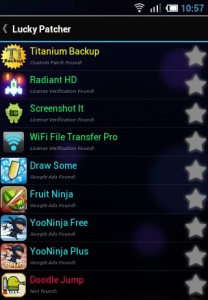
 is a very useful solution to remove the ad banner ugly and uncomfortable on Android
First, you need to download software and install Lucky Patcher on your phone. Next, run the Lucky Patcher, when the dialog box pops up Superuser Request, choose Allow. When the list of applications installed on your computer appears, advertising application that is below their title will be warned, "Google Ads Found!"
Tap the app you want to remove the ad about 2 seconds, there will be a bulletin board out. Here, you select Remove Google Ads, such as banner ads or gaming applications that will be removed. After this step, you can go directly to the app and see the banner ads are not offline.
luckypatcher 發表在 痞客邦 留言(0) 人氣(31)

We tend to use the "temple" of the app but do not want to spend any expense. This means that your smartphone will be the target of the ad. The banner ads are not only unsightly, but also use your data traffic for downloading other ugly ads? If you feel tired of the commercials themselves appear constantly and occupy much space on the screen, then here's how you can help "eliminate" them on Android devices.
Lucky Patcher is a very useful solution to remove the ad banner ugly and uncomfortable on Android, but to do so, you need to download software and install Lucky Patcher on your phone.
luckypatcher 發表在 痞客邦 留言(0) 人氣(2)
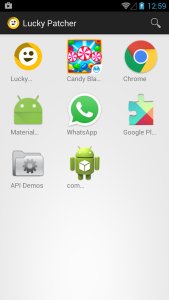 What's New in v5.3.2 ??
- Update custom patches.
- Add patch to core.jar for Android boot.oat in 5 (try with Android backup).
- Updated translations.
luckypatcher 發表在 痞客邦 留言(0) 人氣(39)

Lucky Patcher Version: 6.2.4 Size: 5 MB
Lucky Patcher is a great tool to:
luckypatcher 發表在 痞客邦 留言(0) 人氣(78)

The Lucky Patcher everyone knows you can be useful to us. But since Lucky patcher update the new version has added many useful features, but also caused many difficulties for users without understanding of its use. Simple to install Titanium la or app that you use it when removing the patch or remove old accidentally or intentionally (up to newer) installed on the machine, but when the alarm: For the Problem with Low Storage although other machines balance ram piles. What kind installed anywhere and offers enough space alarm is not new seats.
And now in the new version is much simpler just open the selected Lucky patch click ToolBox bottom left of the screen select "remove al Odex Files" is set.
luckypatcher 發表在 痞客邦 留言(0) 人氣(3)

Lucky Patcher is a great tool to eliminate advertising on Android, modify Permissions, verify advanced applications, bypass permits, and more. You can use Lucky Patcher to unlock a number of applications on Android Market or confirming other verification license.
luckypatcher 發表在 痞客邦 留言(0) 人氣(5)
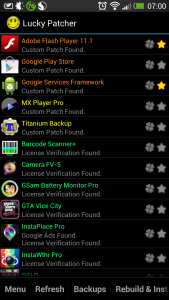
Run "Lucky patcher" up, it will list the software in the machine, depending on the color of the software's level of intervention "Lucky patcher" will be different:
+ Blue: app with "verification" and processing capabilities are very high
luckypatcher 發表在 痞客邦 留言(0) 人氣(7)
 First Lucky Patcher is what? Key Features:
- As a software crack, disable ads in game, software.
- Remove or check the copyright in the game software.
- Running parallel or activate the hack games, software.
- There's also a lot of features that Lucky Patcher bring ....
luckypatcher 發表在 痞客邦 留言(0) 人氣(4)

Application software android multifunction machine, Lucky Patcher is one tool that can be used to remove annoying ads, making backups or backups most frequently used functions such as: removing signatures APK. In the framework of the article, I will guide two basic functions used by Lucky Patcher.
- Hack Game For Machine Has Root By Lucky Patcher
- Elimination APK Signature Verification
luckypatcher 發表在 痞客邦 留言(0) 人氣(2)
